
Play Online and Win Freecell Solitaire
Play Freecell Solitaire at Solitaire.com . Similar to Solitaire, this game lets you to move cards to free open cells as you arrange them.
This adds challenge while keeping the same relaxing goal of building all four Foundations from Ace to King.
On Solitaire.com you can play Turn 3 for free in your browser, no download or signup needed. Use helpful tools like Undo and Hint to improve your skills and enjoy every game.
What is FreeCell Solitaire?
FreeCell is a variation of Solitaire where the goal is to move all 52 face-up cards to the foundation. You do this by freeing up cards in the tableau by sequencing them and using four open cells where any playable card can be placed.
The goal remains the same: build the foundation piles by suit, from Ace to King, using cards from the tableau, stock, and waste piles.
Game Setup and Key Play Areas
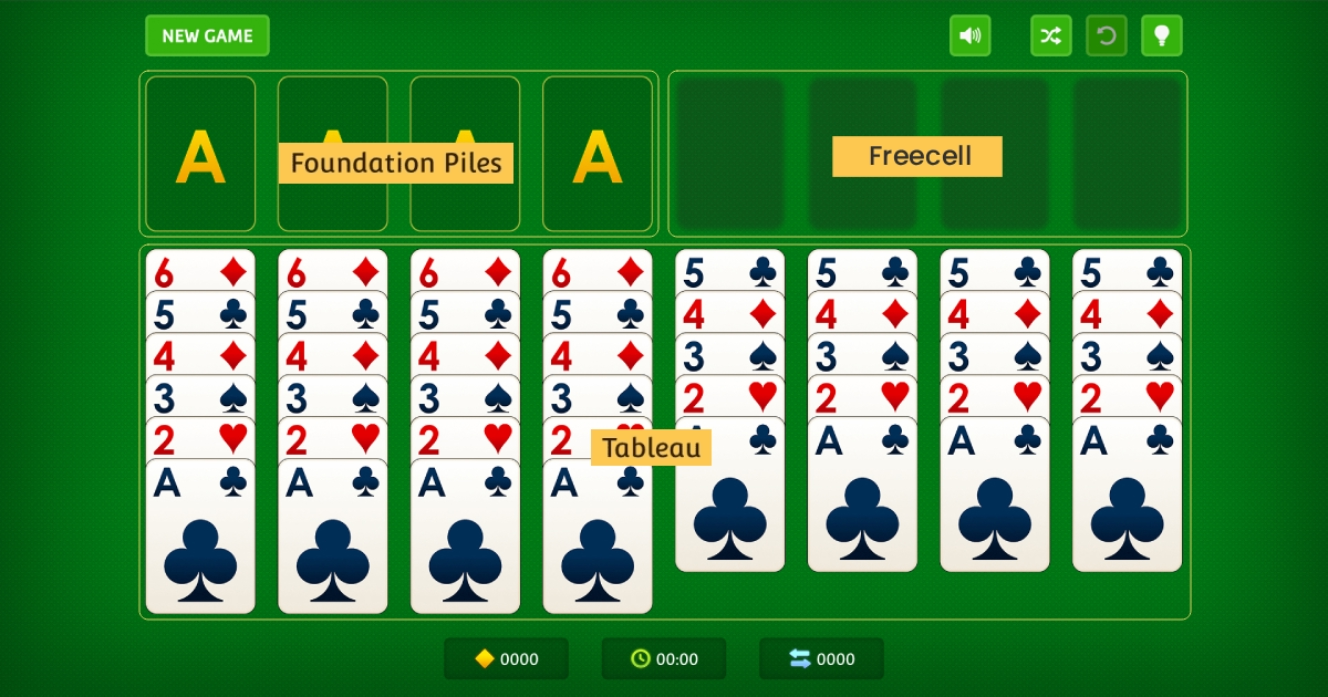
To win at Freecell Solitaire, it helps to understand how the game is set up. Each area has a purpose, and knowing how they work together is key to success.
The Tableau
The tableau is the main play area with seven columns of cards. Build sequences in descending order and alternate colors to reveal face‑down cards.
The Foundation
The foundation contains four piles, one for each suit. Move Aces here first, then build upward to Kings to complete the game.
Available Moves
-
When you start the game, the cards that are available to play are the last cards in the tableau. In other words, you can move cards that have no cards on top of them. If an Ace is playable, you can move it immediately to the foundation.
-
In the tableau, you can move a card on top of another playable card as long as it is of the opposite color and of a higher rank. For example, a playable 3 of Hearts can be moved on top of a 4 of Spades that is at the bottom of another tableau column. On the other hand, if you have 7 Hearts and a 6 of Diamonds, you cannot move the 6 on top of the 7 because they are the same color. Below each black card will need to be a red one, and it needs to be one rank lower. For example, a 5 will go below a 6, Queen below King, and so on.
-
You can move any playable card to one of the four free cells. Only four cards can be in the free cells at any given time. Even though you can use the free cells as much as you want, try to keep them available for future cards you may need to move around.
-
The number of sequenced cards you can move is equivalent to the number of open free cells plus one.
For example:
- If there are four free cells open, you can move five cards.
- If there are three free cells open, you can move four cards.
- If there are two free cells open, you can move three cards.
- If there is one free cell open, you can move two cards.
- If there are no free cells open, you can move one card.
-
There is one exception to this. If you have an open column in addition to free cells, you can move double the number of cards you can move normally. For example, if you have 1 free cell open and one empty tableau column, you can effectively move 4 cards (2 cards for the 1 free cell, multiplied by two). This applies as long as you are not moving cards into the actual empty column, in which case you are unable to take advantage of the doubling.
-
During the process of moving cards from the tableau board to the foundation, you may clear out an entire column. In that case, you can grab any free card and move it to an empty column. It doesn't matter which card it is, as long as it is a free one.
-
Cards can only be moved to the foundation from Ace to King, and they need to be of the same suit. For example, if you move the Ace of Diamonds to the foundation pile, the next card you can place on top of it is the 2 of Diamonds.
-
The advantage of FreeCell is that all cards are uncovered, meaning that there will be no surprises, and you can strategically plan ahead. There may be a situation where you will be left with no options or possible moves. You can undo moves to try other ways of solving the game, or you can start a new game.
Delay building the foundation when needed
Moving cards to the foundation too early can limit your options. Keep them in the tableau if they help uncover face-down cards or build new stacks.
Choose the right King for empty columns
Only Kings can fill empty tableau columns. Choose the King based on color and available matching Queens to open up future moves more effectively.
Use Undo as a learning tool
The Undo button lets you safely test different move paths. Use it often to learn better sequences and improve your long-term strategy.
Turn 1 vs. Turn 3: Which Is Better for You?

Both versions of Classic Solitaire use the same rules, but how you draw from the Stockpile changes the game.
Turn 1 → Easier and faster
Turn 1 draws one card at a time from the Stockpile. This gives more control and easier access to playable cards. It's often better for beginners or casual players.
Turn 3 → Slower but more strategic
Turn 3 draws three cards at once. You can only use the top card unless you move it. This adds complexity and often requires several moves to unlock the right sequence.
Recommendation: If you're new or prefer a relaxed pace, start with Turn 1. If you enjoy more challenge and strategy, Turn 3 offers a satisfying twist.
Win Rate and Difficulty of Turn 3 Solitaire
Turn 3 Solitaire is more challenging than Turn 1, but many players enjoy the added strategy it brings.
According to game data:
- Turn 1 win rate: Around 33%
- Turn 3 win rate: Around 11%
The lower win rate comes from drawing three cards at a time, with only one playable. Still, making smart moves, being patient, and using tools like Undo and Hint on Solitaire.com can help you win more often.
Scoring in Turn 3 Solitaire (Standard vs. Vegas)
Solitaire Turn 3 uses two scoring options: Standard and Vegas. Each rewards different play styles.
Standard Scoring (used on Solitaire.com)
- +10 points: Move card to the Foundation
- +5 points: Flip a face-down card
- +100 points: Win the game
- 0 points: Undo or recycle the Stockpile
Vegas Scoring
- Start: –$52 (imaginary money)
- +$5 per card added to the Foundation
- Goal: Finish with a positive score
Vegas mode adds light pressure and suits players who enjoy a challenge. Solitaire.com uses a standard scoring system.
Play Responsively on Any Device
Solitaire Turn 3 works in all modern browsers, desktop, tablet, or phone.
No downloads or registration are needed. The game runs smoothly with a responsive design, whether you tap or click.
Prefer apps? Solitaire.com is also available on iOS and Android with the same features, including Unlimited Undo and Hints.
Other Solitaire Games You Might Enjoy
If you enjoy Turn 3, explore more games on Solitaire.com:
- Classic Solitaire: Easier draw style for relaxed play
- Spider Solitaire: Stack suits in a deeper challenge
- Daily Challenge: Solve a new puzzle every day with prizes
These games offer variety and mental stimulation for every skill level.
Enjoy Classic Solitaire Turn 3 at Your Own Pace
Turn 3 Solitaire offers a familiar but more strategic twist on the classic game. With three-card draws, patient play, and the right tools, like Hints, Undo, and Daily Challenges, you can sharpen your skills while enjoying a relaxing, rewarding game.
Play anytime on Solitaire.com, in your browser or mobile app, no download, always free.
Frequently Asked Questions
What’s the difference between Turn 1 and Turn 3 Solitaire?
Turn 1 draws one card at a time. Turn 3 reveals three, but you can only play the top card.
How do you cycle the stock in Turn 3?
Click the Stockpile. After it's empty, the waste pile flips and becomes the new stock in the same order.
Is Turn 3 Solitaire a game of luck or skill?
Both. Luck decides card order, but skill improves your chances by planning each move.
What’s a good score in Turn 3 Solitaire?
In Standard mode, scores over 500 show strong play. The theoretical best is 745.
Can you win every Turn 3 Solitaire game?
No. Some are unwinnable, but strategy and features like Undo help improve your odds.
What’s the trick to winning more Turn 3 games?
Reveal face-down cards early, plan King placements, and use Undo to test sequences.